# Configuration for QField's new attribute form features (version 3.3)
**URL:** https://community.qfield.org/t/configuration-for-qfields-new-attribute-form-features-version-3-3/437
**Category:** Ask the Community
**Tags:** gh-import
**Created:** [14 May 2025 02:19 UTC](https://community.qfield.org/t/configuration-for-qfields-new-attribute-form-features-version-3-3/437 "2025-05-14T02:19:22Z")
**Posts on this page:** 12
**Page:** 1
### Author:  [@system](https://community.qfield.org/u/system)
#### Post date: [14 May 2025 02:19 UTC](https://community.qfield.org/t/configuration-for-qfields-new-attribute-form-features-version-3-3/437/1 "2025-05-14T02:19:22Z")
_Note: I am using QGIS 3.28.15 (on a Windows computer) and QField 3.3.6 (on a Windows based Tablet)._
I am wondering how/where to enable the (pretty cool) following new features of the new release 3.3:
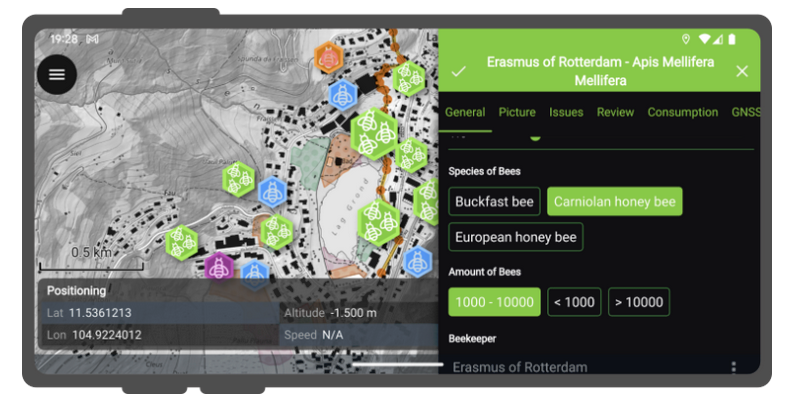
> - The feature form’s value relation widget gained grouping capabilities to enhance ordering of items
> - The feature form’s value map widget gained a toggle buttons interface for faster data entry and an item filtering for large combobox lists
> 
From my understanding of QField such features like the layout/settings of the attribute form are configured in the QGIS project itself. However in my current QGIS version 3.28 I cannot figure out where to enable in example the toggle buttons for the value map widget.
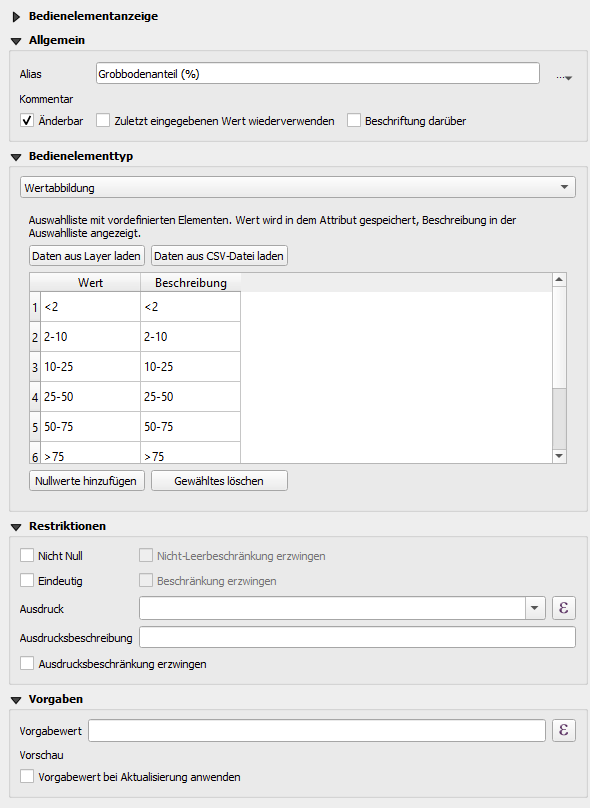
Therefore, my questions: Are these new settings configured in QGIS? What version of QGIS would I need for the configuration?
* * *
_Imported from [GitHub discussion](https://github.com/opengisch/qfield/discussions/5433) by @lorenzomorning on 2024-07-09T09:54:34Z_
---
### Author:  [@system](https://community.qfield.org/u/system)
#### Post date: [14 May 2025 02:19 UTC](https://community.qfield.org/t/configuration-for-qfields-new-attribute-form-features-version-3-3/437/2 "2025-05-14T02:19:23Z")
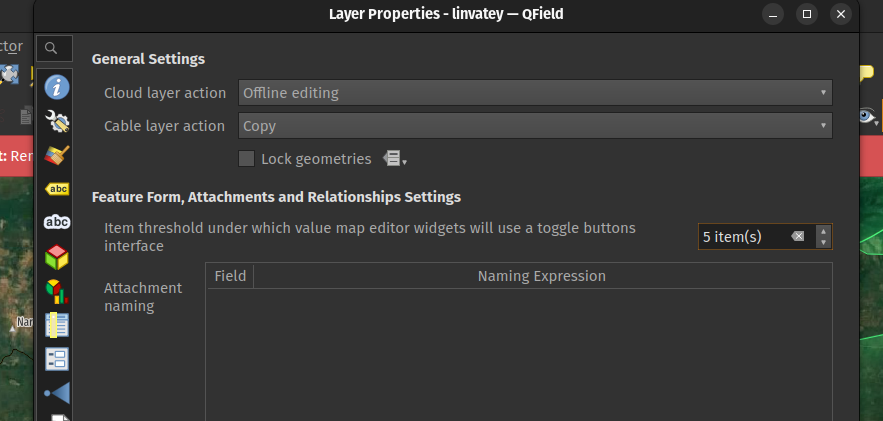
lorenzomorning , it’s a layer-wide setting, you’ll find it in the QField panel (provided you installed the QFieldSync plugin):
* * *
_Imported from [GitHub comment](https://github.com/opengisch/QField/discussions/5433#discussioncomment-9997293) by @nirvn on 2024-07-09T10:58:47Z_
---
### Author:  [@system](https://community.qfield.org/u/system)
#### Post date: [14 May 2025 02:19 UTC](https://community.qfield.org/t/configuration-for-qfields-new-attribute-form-features-version-3-3/437/3 "2025-05-14T02:19:24Z")
nirvn thanks for the fast response and hint! The layer-wide setting totally makes sense 👍
However, the newest version of QFieldSync that is available at my Plugin Manager in QGIS is v.4.9.1
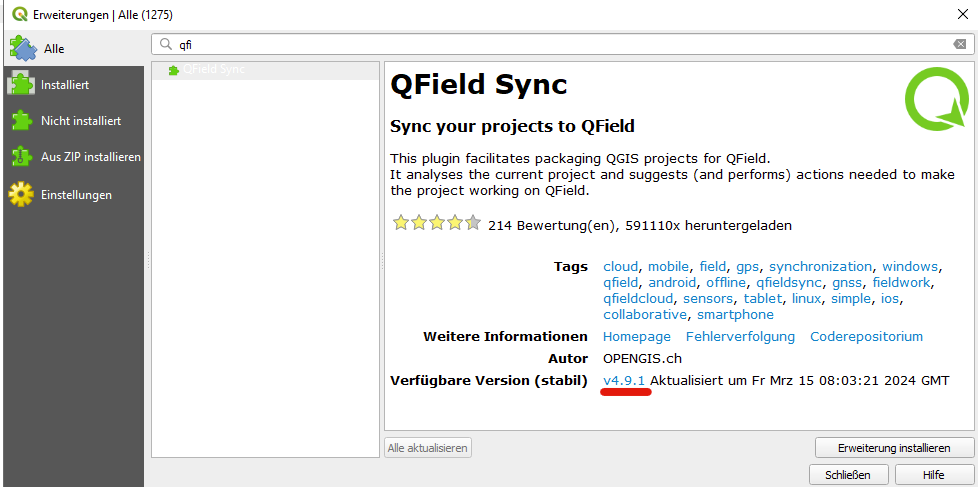
But your [release changelog of QFieldSync](https://github.com/opengisch/qfieldsync/releases) indicates that the configuration of the new toggle buttons is only available from v.4.10.0 on.
So must I install the newest version of the plugin via the source code from a .zip file or is the installation somehow directly accessble via the QGIS Plugin Manager?
_Note: When I install the v.4.10.0 from the .zip file provided on github, unfortunatley my layer properties look like the following:_
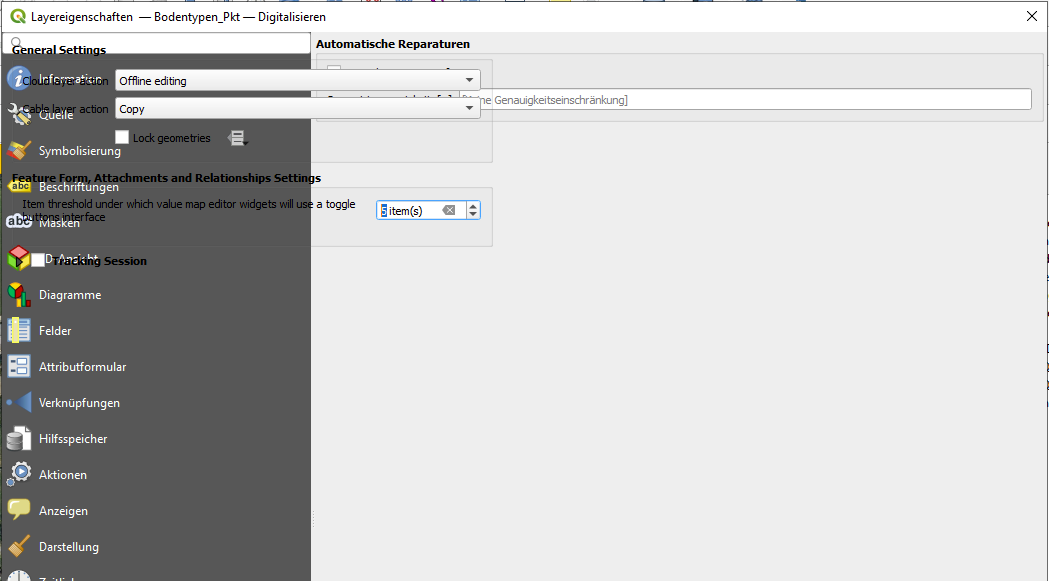
_with the following error message:_
```auto
AttributeError: 'LayerSource' object has no attribute 'value_map_button_interface_threshold'
Traceback (most recent call last):
File "C:\Users/lorenz.beck/AppData/Roaming/QGIS/QGIS3\profiles\default/python/plugins\qfieldsync\gui\map_layer_config_widget.py", line 48, in createWidget
return MapLayerConfigWidget(layer, canvas, parent)
File "C:\Users/lorenz.beck/AppData/Roaming/QGIS/QGIS3\profiles\default/python/plugins\qfieldsync\gui\map_layer_config_widget.py", line 131, in __init__
self.layer_source.value_map_button_interface_threshold
AttributeError: 'LayerSource' object has no attribute 'value_map_button_interface_threshold'
Python-Version: 3.9.18 (heads/master:c290dc6, Jan 14 2024, 01:36:02) [MSC v.1929 64 bit (AMD64)]
QGIS-Version: 3.28.15-Firenze Firenze, 252ad49ddc
```
* * *
_Imported from [GitHub comment](https://github.com/opengisch/QField/discussions/5433#discussioncomment-9997472) by @lorenzomorning on 2024-07-09T11:21:15Z_
---
### Author:  [@system](https://community.qfield.org/u/system)
#### Post date: [14 May 2025 02:19 UTC](https://community.qfield.org/t/configuration-for-qfields-new-attribute-form-features-version-3-3/437/4 "2025-05-14T02:19:26Z")
Hi nirvn,
Is it planned to make the the newer version (4.10.0) of QFieldSync available via the Plugin Manager for more “older” QGIS versions? 🙂
I am currently working with QGIS 3.28.15 and unfortunately the newest available QFieldSync version (4.9.1) does not allow me to set the value map toggle buttons.
* * *
_Imported from [GitHub comment](https://github.com/opengisch/QField/discussions/5433#discussioncomment-10111732) by @lorenzomorning on 2024-07-22T07:42:58Z_
---
### Author:  [@system](https://community.qfield.org/u/system)
#### Post date: [14 May 2025 02:19 UTC](https://community.qfield.org/t/configuration-for-qfields-new-attribute-form-features-version-3-3/437/5 "2025-05-14T02:19:28Z")
Hi lorenzomorning Could you try uninstalling and installing again?
* * *
_Imported from [GitHub comment](https://github.com/opengisch/QField/discussions/5433#discussioncomment-10117040) by @SeqLaz on 2024-07-22T16:40:39Z_
---
### Author:  [@system](https://community.qfield.org/u/system)
#### Post date: [14 May 2025 02:19 UTC](https://community.qfield.org/t/configuration-for-qfields-new-attribute-form-features-version-3-3/437/6 "2025-05-14T02:19:29Z")
Hi SeqLaz,
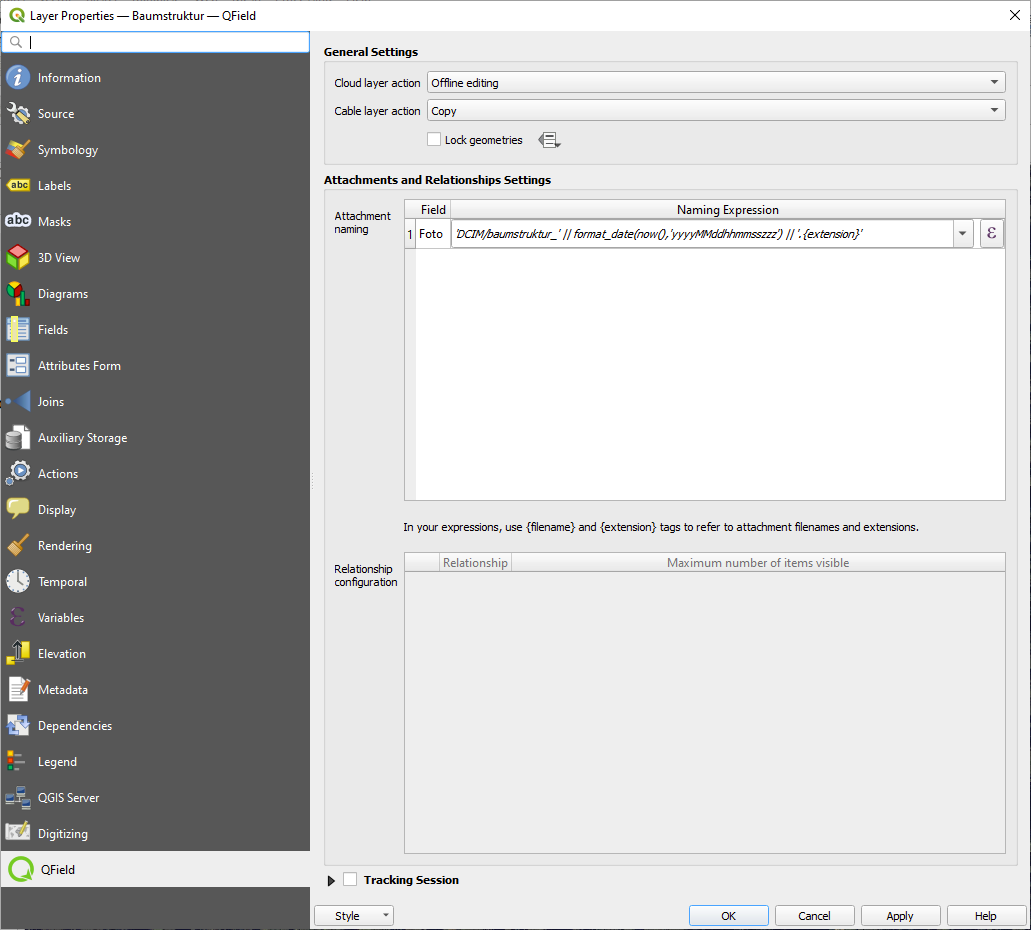
I uninstalled and reinstalled the plugin, but nothing changes in the user interface. As you can see there is no additional option to set the toggle buttons for a value map:
* * *
_Imported from [GitHub comment](https://github.com/opengisch/QField/discussions/5433#discussioncomment-10127649) by @lorenzomorning on 2024-07-23T14:41:26Z_
---
### Author:  [@system](https://community.qfield.org/u/system)
#### Post date: [14 May 2025 02:19 UTC](https://community.qfield.org/t/configuration-for-qfields-new-attribute-form-features-version-3-3/437/7 "2025-05-14T02:19:31Z")
Hi lorenzomorning, when uninstalling and installing it again, did you use the zipped version [4.10.0](https://github.com/opengisch/qfieldsync/releases/tag/v4.10.0) or from the plugins repository?
* * *
_Imported from [GitHub comment](https://github.com/opengisch/QField/discussions/5433#discussioncomment-10129563) by @SeqLaz on 2024-07-23T17:53:09Z_
---
### Author:  [@system](https://community.qfield.org/u/system)
#### Post date: [14 May 2025 02:19 UTC](https://community.qfield.org/t/configuration-for-qfields-new-attribute-form-features-version-3-3/437/8 "2025-05-14T02:19:32Z")
Hi SeqLaz,
I now tried both:
1. Installing it from the plugins repository (4.9.1) obviously does not add any new layer control sections (see image above)
2. Installing the zipped version [4.10.0](https://github.com/opengisch/qfieldsync/releases/tag/v4.10.0) results in a kind of overlay for the QField layer settings (see image below, or [post from 9th July](https://github.com/opengisch/QField/discussions/5433#discussioncomment-9997472)). It now adds the option for controlling the toggle buttons of a value map, but unfortunately it is not nicely usable due the overlay…

* * *
_Imported from [GitHub comment](https://github.com/opengisch/QField/discussions/5433#discussioncomment-10133993) by @lorenzomorning on 2024-07-24T06:53:51Z_
---
### Author:  [@system](https://community.qfield.org/u/system)
#### Post date: [14 May 2025 02:19 UTC](https://community.qfield.org/t/configuration-for-qfields-new-attribute-form-features-version-3-3/437/9 "2025-05-14T02:19:34Z")
Hi SeqLaz nirvn,
you are probably super buisy and I do not need a direct solution for my problem described above. But it is planned to soon integrate the current QFieldSync updates (e.g. toggle button control) into the version available within the QGIS Plugin Manager? 🙂
* * *
_Imported from [GitHub comment](https://github.com/opengisch/QField/discussions/5433#discussioncomment-10273651) by @lorenzomorning on 2024-08-08T09:46:24Z_
---
### Author:  [@system](https://community.qfield.org/u/system)
#### Post date: [14 May 2025 02:19 UTC](https://community.qfield.org/t/configuration-for-qfields-new-attribute-form-features-version-3-3/437/10 "2025-05-14T02:19:35Z")
Hi lorenzomorning,
Could be possible from your side to upgrade the QGIS version to the latest version?
* * *
_Imported from [GitHub comment](https://github.com/opengisch/QField/discussions/5433#discussioncomment-10278219) by @SeqLaz on 2024-08-08T17:22:27Z_
---
### Author:  [@system](https://community.qfield.org/u/system)
#### Post date: [14 May 2025 02:19 UTC](https://community.qfield.org/t/configuration-for-qfields-new-attribute-form-features-version-3-3/437/11 "2025-05-14T02:19:37Z")
Release of qfieldsync 4.10 has been delayed due to technical problems with the upload to the plugin registry, but has finally made it today. [v4.10.1](https://github.com/opengisch/qfieldsync/releases/tag/v4.10.1) is now available from the QGIS plugin repository and comes with this feature.
* * *
_Imported from [GitHub comment](https://github.com/opengisch/QField/discussions/5433#discussioncomment-10304412) by @m-kuhn on 2024-08-11T11:26:05Z_
---
### Author:  [@system](https://community.qfield.org/u/system)
#### Post date: [14 May 2025 02:19 UTC](https://community.qfield.org/t/configuration-for-qfields-new-attribute-form-features-version-3-3/437/12 "2025-05-14T02:19:38Z")
m-kuhn , nirvn , SeqLaz thank you all for the update and the great and steady improvements of QField. It is so valuable for us working with this software, and at the same time it’s a lot of fun 🙂
* * *
_Imported from [GitHub comment](https://github.com/opengisch/QField/discussions/5433#discussioncomment-10311561) by @lorenzomorning on 2024-08-12T08:55:22Z_