# QField: Vice-versa auto-fill of two fields using value relation
**URL:** https://community.qfield.org/t/qfield-vice-versa-auto-fill-of-two-fields-using-value-relation/451
**Category:** Ask the Community
**Tags:** gh-import
**Created:** [14 May 2025 02:21 UTC](https://community.qfield.org/t/qfield-vice-versa-auto-fill-of-two-fields-using-value-relation/451 "2025-05-14T02:21:31Z")
**Posts on this page:** 2
**Page:** 1
### Author:  [@system](https://community.qfield.org/u/system)
#### Post date: [14 May 2025 02:21 UTC](https://community.qfield.org/t/qfield-vice-versa-auto-fill-of-two-fields-using-value-relation/451/1 "2025-05-14T02:21:31Z")
I am setting up a geopackage in QGIS (LTR 3.28.15) to be used in the field with QField (3.2 - Congo) for mapping birds.
My geopackage has the following layers:
- **Brutvoegel:** Point geometry for saving my observations, among others having two fields a) `"Art"` to map the species and b) `"Art_kurz"` to insert the abbreviation of the species
- **sl\_brutvoegel:** A non-spatial table with information for each species (`"SL_Art"` - species, `"SL_Wissenschaftlicher_Name"` - scientific name, `"SL_Artenkürzel"` - abbreviation) working as a look-up table to automatically fill field attributes
**My goal:**
I want to set up the attribute forms in QGIS in a way that I can fill one of the two fields (either `"Art"` or `"Art_kurz"`) and based on that one field it automatically updates the other field.
Example: I can type ‘Amsel’ (with autocomplete functionality and suggestions from the look-up table field `"SL_Art"`) as the species in the field `"Art"` and it automatically fills the field `"Art_kurz"` with an ‘A’. It should also work the other way round, so that I can type ‘A’ as abbreviation (with autocomplete functionality and suggestions from the look-up table field `"SL_Artenkürzel"`) in the field `"Art_kurz"` and based on that it will fill the field `"Art"` with my corresponding species ‘Amsel’.
For now I am using a combination of value relation widget (to refer to my lookup table with the layer: `sl_bruvoegel`, key\_column: `SL_Art`|`SL_Artenkürzel`, value\_column: `SL_Art`|`SL_Artenkürzel`) and default values (to fill one field based on the other one).
Here are my QGIS settings for the attribute form for the _Brutvoegel_ field `"Art"`:
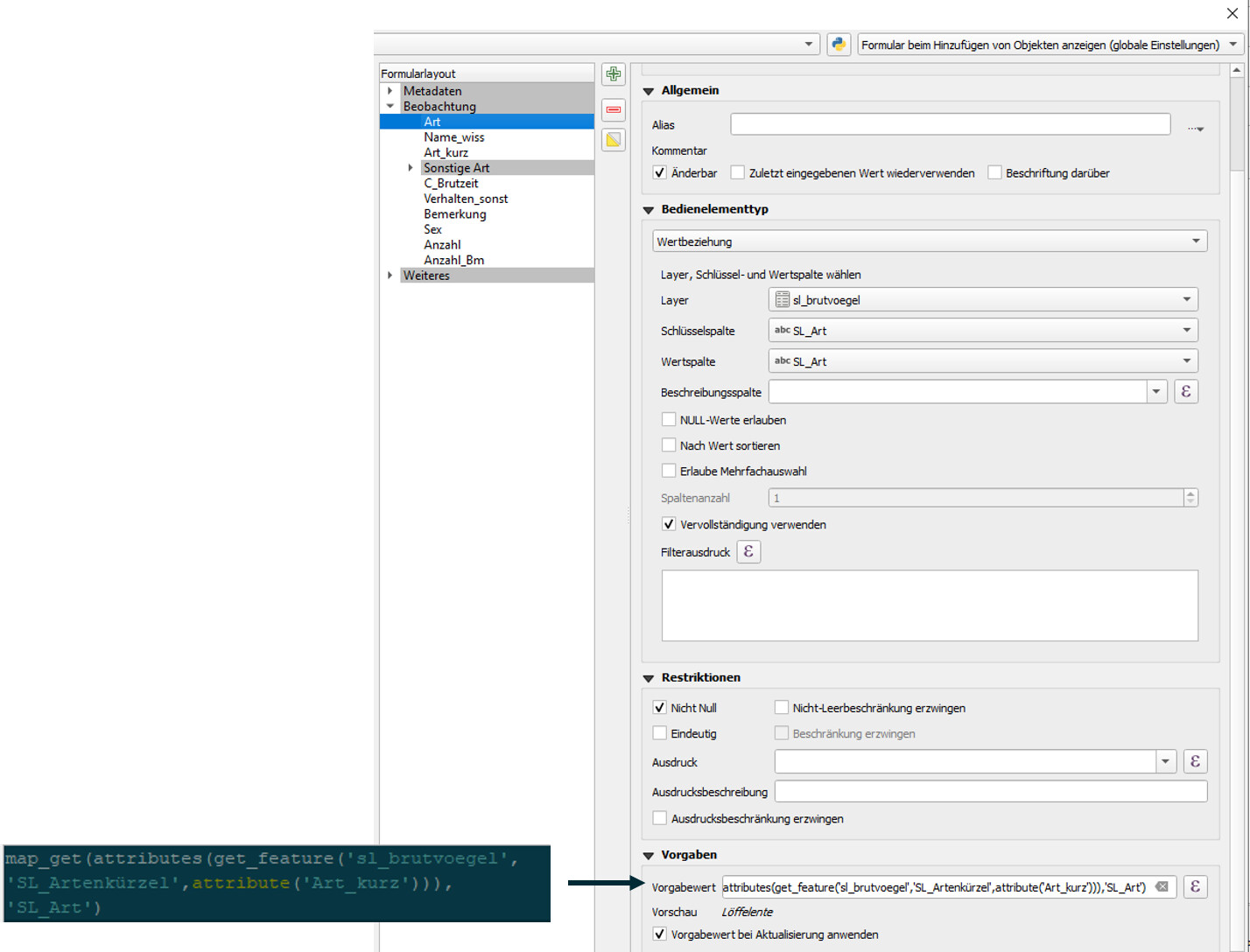
Expression: `map_get(attributes(get_feature('sl_brutvoegel','SL_Artenkuerzel',attribute('Art_kurz'))),'SL_Art')`
Here are my QGIS settings for the attribute form for the _Brutvoegel_ field `"Art_kurz"`:

Expression: `map_get(attributes(get_feature('sl_brutvoegel','SL_Art',attribute('Art'))),'SL_Artenkuerzel')`
Here is a .zip of the packaged project folder for QField:
[240704\_testgoeg\_mini.zip](https://github.com/user-attachments/files/16097856/240704_testgoeg_mini.zip)
**My Observation**
My current approach perfectly works in QGIS as well as on QField Desktop Version (Windows, QField Vers. 3.2.2 ). But when I import my project to a tablet/smartphone device (Android or Windows, bot Vers. 3.2.X) the auto-fill only works in one way: I can type ‘A’ in the abbreviation field `"Art_kurz"` and it correctly fills my field `"Art"` with ‘Amsel’. The other way round is not unfortunately not working.
Here is a link to a screen recording of the issue (Samsung Galaxy Tablet): https://drive.google.com/file/d/111raO-6FoqOSMGQoSrMpENTsIB55Rxlx/view?usp=sharing
Here is a link to my current gis.stackexchange issue: https://gis.stackexchange.com/questions/483364/qfield-vice-versa-auto-fill-of-two-fields-using-value-relation
Where does this odd error come from and how can I correctly set up my geopackage in a way, so that it works stable in QField?
_Note: My intuitive idea to fill the field “Art”|“Art\_kurz” based on its counter field by simply setting the default value as “Art\_kurz”|“Art” and set the key column of the value relation widget to SL\_Artenkürzel|SL\_Art and the value\_column to SL\_Art|SL\_Artenkürzel somehow did not work in this “double auto-fill” problem._
* * *
_Imported from [GitHub discussion](https://github.com/opengisch/qfield/discussions/5423) by @lorenzomorning on 2024-07-04T10:15:50Z_
---
### Author:  [@system](https://community.qfield.org/u/system)
#### Post date: [14 May 2025 02:21 UTC](https://community.qfield.org/t/qfield-vice-versa-auto-fill-of-two-fields-using-value-relation/451/2 "2025-05-14T02:21:33Z")
I set up my geopackage from scratch again and it first perfectly worked in both ways. BUT after I did a few testings (3-5) I unfortunately observed the same erroneous behavior as described above.
* * *
_Imported from [GitHub comment](https://github.com/opengisch/QField/discussions/5423#discussioncomment-9964868) by @lorenzomorning on 2024-07-05T06:31:27Z_