# QGIS QFieldCloud Plugin not accepting password/login (doesn't help changing pwd either ...)
**URL:** https://community.qfield.org/t/qgis-qfieldcloud-plugin-not-accepting-password-login-doesnt-help-changing-pwd-either/920
**Category:** Ask the Community
**Tags:** gh-import
**Created:** [14 May 2025 03:16 UTC](https://community.qfield.org/t/qgis-qfieldcloud-plugin-not-accepting-password-login-doesnt-help-changing-pwd-either/920 "2025-05-14T03:16:07Z")
**Posts on this page:** 13
**Page:** 1
### Author:  [@system](https://community.qfield.org/u/system)
#### Post date: [14 May 2025 03:16 UTC](https://community.qfield.org/t/qgis-qfieldcloud-plugin-not-accepting-password-login-doesnt-help-changing-pwd-either/920/1 "2025-05-14T03:16:07Z")
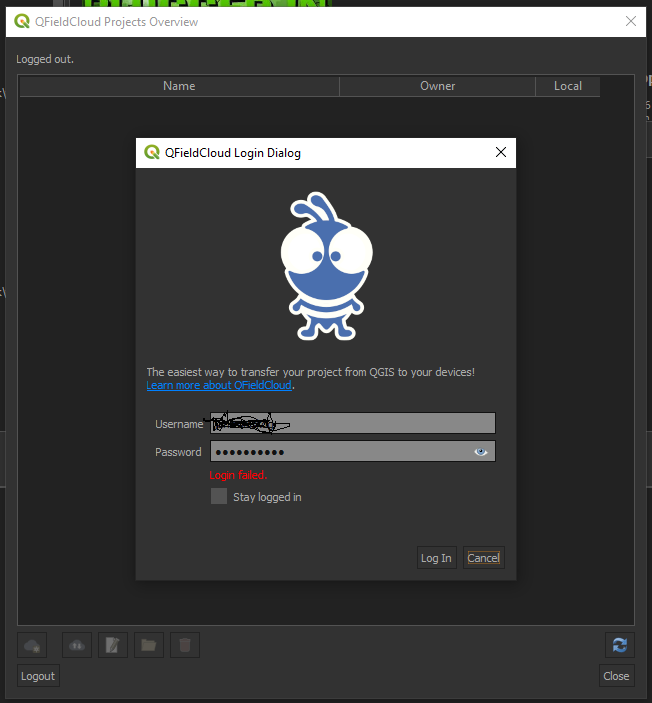
Hei I am surely just doing some stupid mistake but maybe someone can help…
After first times of getting “Login failed” I changed password on the QFieldCloud page but not helping either…
I am using 4.0.0-BETA15 of the plugin to test out Cloud functionality for QField…
QGIS is 3.20.3-Odense on a norwegian Windows 10 Pro
Deinstalling / Reinstalling of the Plugin did not work either…
BUT: Sending me an invitasjon to a second email to create a “new” user worked out …
* * *
_Imported from [GitHub discussion](https://github.com/opengisch/qfield/discussions/2457) by @janulimoelv on 2021-10-26T16:20:14Z_
---
### Author:  [@system](https://community.qfield.org/u/system)
#### Post date: [14 May 2025 03:16 UTC](https://community.qfield.org/t/qgis-qfieldcloud-plugin-not-accepting-password-login-doesnt-help-changing-pwd-either/920/2 "2025-05-14T03:16:08Z")
In order to provide a clearer and more manageable discussion forum and to have all discussions about QField and related products (i.e. QFieldCloud and QFieldSync) in a single place, we transferred all the discussions from the QFieldCloud to the [QField repository](https://github.com/opengisch/QField/discussions).
* * *
_Imported from [GitHub comment](https://github.com/opengisch/QField/discussions/2457#discussioncomment-2088865) by @marioba on 2022-02-01T13:25:30Z_
---
### Author:  [@system](https://community.qfield.org/u/system)
#### Post date: [14 May 2025 03:16 UTC](https://community.qfield.org/t/qgis-qfieldcloud-plugin-not-accepting-password-login-doesnt-help-changing-pwd-either/920/3 "2025-05-14T03:16:10Z")
janulimoelv Hey, can you please try with the latest 4.0.0-BETA20? There are quite a lot of changes recently and probably it solves your issue?
* * *
_Imported from [GitHub comment](https://github.com/opengisch/QField/discussions/2457#discussioncomment-2321960) by @suricactus on 2022-03-09T07:21:44Z_
---
### Author:  [@system](https://community.qfield.org/u/system)
#### Post date: [14 May 2025 03:16 UTC](https://community.qfield.org/t/qgis-qfieldcloud-plugin-not-accepting-password-login-doesnt-help-changing-pwd-either/920/4 "2025-05-14T03:16:11Z")
Did you find a solution? I deleted and reinstalled the plug-in multiple times updated it, changed my password, tried a different mail, nothing worked.
* * *
_Imported from [GitHub comment](https://github.com/opengisch/QField/discussions/2457#discussioncomment-2550230) by @Iagree12 on 2022-04-12T08:27:03Z_
---
### Author:  [@system](https://community.qfield.org/u/system)
#### Post date: [14 May 2025 03:16 UTC](https://community.qfield.org/t/qgis-qfieldcloud-plugin-not-accepting-password-login-doesnt-help-changing-pwd-either/920/5 "2025-05-14T03:16:13Z")
Can you share a little bit more details about you operating system, qgis version, qfieldsync version and qfieldcloud username?
* * *
_Imported from [GitHub comment](https://github.com/opengisch/QField/discussions/2457#discussioncomment-2550326) by @suricactus on 2022-04-12T08:39:55Z_
---
### Author:  [@system](https://community.qfield.org/u/system)
#### Post date: [14 May 2025 03:16 UTC](https://community.qfield.org/t/qgis-qfieldcloud-plugin-not-accepting-password-login-doesnt-help-changing-pwd-either/920/6 "2025-05-14T03:16:14Z")
Sure, operating system is Windows 10 Enterprise, qgis version 3.22.3, qfieldsync version is 4.00. The username is praktikum\_natur.
* * *
_Imported from [GitHub comment](https://github.com/opengisch/QField/discussions/2457#discussioncomment-2550447) by @Iagree12 on 2022-04-12T08:58:31Z_
---
### Author:  [@system](https://community.qfield.org/u/system)
#### Post date: [14 May 2025 03:16 UTC](https://community.qfield.org/t/qgis-qfieldcloud-plugin-not-accepting-password-login-doesnt-help-changing-pwd-either/920/7 "2025-05-14T03:16:16Z")
Do you manage to login using the web interface or QField? If you still fail to login, try to reset the password.
* * *
_Imported from [GitHub comment](https://github.com/opengisch/QField/discussions/2457#discussioncomment-2584705) by @suricactus on 2022-04-18T08:09:36Z_
---
### Author:  [@system](https://community.qfield.org/u/system)
#### Post date: [14 May 2025 03:16 UTC](https://community.qfield.org/t/qgis-qfieldcloud-plugin-not-accepting-password-login-doesnt-help-changing-pwd-either/920/8 "2025-05-14T03:16:17Z")
Yes I can login via the browser with no problem.
* * *
_Imported from [GitHub comment](https://github.com/opengisch/QField/discussions/2457#discussioncomment-2584913) by @Iagree12 on 2022-04-18T09:06:06Z_
---
### Author:  [@system](https://community.qfield.org/u/system)
#### Post date: [14 May 2025 03:16 UTC](https://community.qfield.org/t/qgis-qfieldcloud-plugin-not-accepting-password-login-doesnt-help-changing-pwd-either/920/9 "2025-05-14T03:16:19Z")
Are you sure you entered the exact same characters as originally wanted? Can you please change your password, try again and share results? Make sure that capital letters matter.
* * *
_Imported from [GitHub comment](https://github.com/opengisch/QField/discussions/2457#discussioncomment-2590928) by @suricactus on 2022-04-19T07:46:57Z_
---
### Author:  [@system](https://community.qfield.org/u/system)
#### Post date: [14 May 2025 03:16 UTC](https://community.qfield.org/t/qgis-qfieldcloud-plugin-not-accepting-password-login-doesnt-help-changing-pwd-either/920/10 "2025-05-14T03:16:20Z")
You had me doubting my sanity for a moment, but yes, I am sure. It works fine in the browser and I can also sign in on other devices no problem. The difficulties are specific to this one PC which I am assigned to at work, would you recommend de-/reinstalling QGIS completely?
* * *
_Imported from [GitHub comment](https://github.com/opengisch/QField/discussions/2457#discussioncomment-2598776) by @Iagree12 on 2022-04-20T07:09:14Z_
---
### Author:  [@system](https://community.qfield.org/u/system)
#### Post date: [14 May 2025 03:16 UTC](https://community.qfield.org/t/qgis-qfieldcloud-plugin-not-accepting-password-login-doesnt-help-changing-pwd-either/920/11 "2025-05-14T03:16:22Z")
Sorry for questioning you on basic things. Just wanted to make sure you have carefully written the password as it is. I have done obvious mistakes myself multiple times. No need to reinstall QGIS completely, you can try with a new QGIS profile. If not, try registering a new user on QFieldCloud and try again.
* * *
_Imported from [GitHub comment](https://github.com/opengisch/QField/discussions/2457#discussioncomment-2601195) by @suricactus on 2022-04-20T13:17:10Z_
---
### Author:  [@system](https://community.qfield.org/u/system)
#### Post date: [14 May 2025 03:16 UTC](https://community.qfield.org/t/qgis-qfieldcloud-plugin-not-accepting-password-login-doesnt-help-changing-pwd-either/920/12 "2025-05-14T03:16:23Z")
It´s all good, I was just so sure I had he right password. It doesn´t work with a new profile either, but it works on other devices, I will just change PCs for now, but thank you for your help.
* * *
_Imported from [GitHub comment](https://github.com/opengisch/QField/discussions/2457#discussioncomment-2606816) by @Iagree12 on 2022-04-21T07:31:42Z_
---
### Author:  [@system](https://community.qfield.org/u/system)
#### Post date: [14 May 2025 03:16 UTC](https://community.qfield.org/t/qgis-qfieldcloud-plugin-not-accepting-password-login-doesnt-help-changing-pwd-either/920/13 "2025-05-14T03:16:24Z")
Sorry to hear that. One last question before giving up. If you go to QGIS menu and make sure that `View -> Panels -> Debugging & Development Tools` is open, can you try to login and check for a POST request to app.qfield.cloud/api/v1/auth/login/ . If you open the details, you should check the value on the `Content -> Data` line. It should have something like this:

Can you make sure you see your username and password there? Note the value continues after the ellipsis.
No worries, this data is only visible on your QGIS. 🙂
* * *
_Imported from [GitHub comment](https://github.com/opengisch/QField/discussions/2457#discussioncomment-2612300) by @suricactus on 2022-04-22T00:43:09Z_