Hi there,
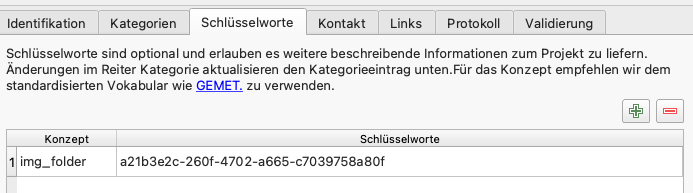
In qgis we can set custom metadata key at project level
Which reads in a qgs file as
...
a21b3e2c-260f-4702-a665-c7039758a80f
My question is, can we access this from a app Extension (in qml)? I’ve searched through the header files but could not find anything about reading project metadata.
Many thanks!
Toni
Hi Toni,
you can get a keyword’s value using the ExpressionEvaluator:
import org.qfield

ExpressionEvaluator {
    id: exprEval
    expressionText: "@project_keywords['keyword']" //replace 'keyword' with your keyword's concept/key
    project: qgisProject
}
and then exprEval.evaluate() returns the value of the specified keyword.
Depending on your use case, you could also use custom project/expression variables instead, since they are super easy to access from within a QField plugin and also editable natively via the QField user interface.
import org.qfield

let projectVariables = ExpressionContextUtils.projectVariables(qgisProject);
for (var key in projectVariables) {
    iface.logMessage(key + ": " + projectVariables[key]);
}
Hope this helps!
2 Likes
Wonderful! This helps! Thanks a lot!