I am setting up a geopackage in QGIS (LTR 3.28.15) to be used in the field with QField (3.2 - Congo) for mapping birds.
My geopackage has the following layers:
- Brutvoegel: Point geometry for saving my observations, among others having two fields a)
"Art"to map the species and b)"Art_kurz"to insert the abbreviation of the species - sl_brutvoegel: A non-spatial table with information for each species (
"SL_Art"- species,"SL_Wissenschaftlicher_Name"- scientific name,"SL_Artenkürzel"- abbreviation) working as a look-up table to automatically fill field attributes
My goal:
I want to set up the attribute forms in QGIS in a way that I can fill one of the two fields (either "Art" or "Art_kurz") and based on that one field it automatically updates the other field.
Example: I can type ‘Amsel’ (with autocomplete functionality and suggestions from the look-up table field "SL_Art") as the species in the field "Art" and it automatically fills the field "Art_kurz" with an ‘A’. It should also work the other way round, so that I can type ‘A’ as abbreviation (with autocomplete functionality and suggestions from the look-up table field "SL_Artenkürzel") in the field "Art_kurz" and based on that it will fill the field "Art" with my corresponding species ‘Amsel’.
For now I am using a combination of value relation widget (to refer to my lookup table with the layer: sl_bruvoegel, key_column: SL_Art|SL_Artenkürzel, value_column: SL_Art|SL_Artenkürzel) and default values (to fill one field based on the other one).
Here are my QGIS settings for the attribute form for the Brutvoegel field "Art":
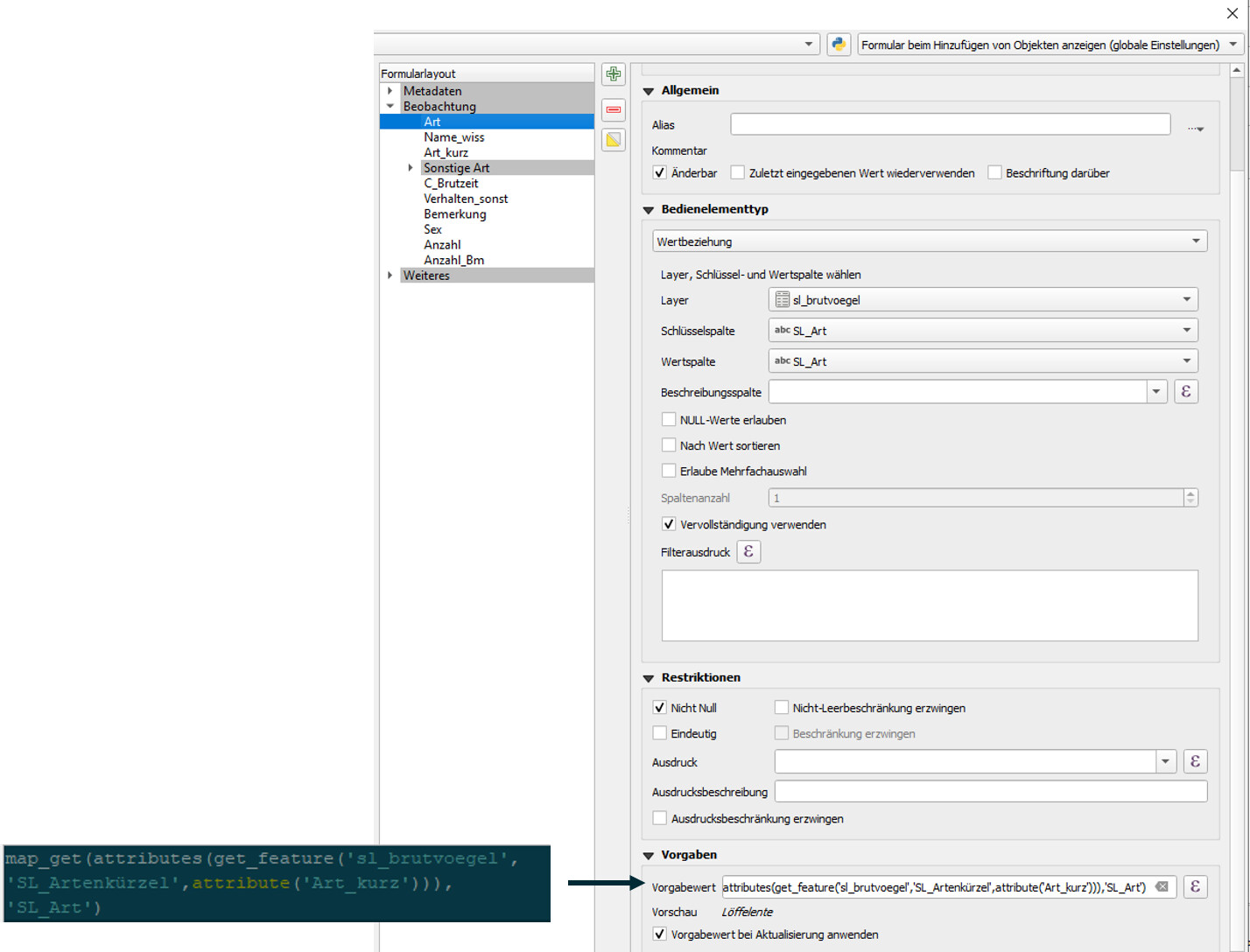
Expression:
map_get(attributes(get_feature('sl_brutvoegel','SL_Artenkuerzel',attribute('Art_kurz'))),'SL_Art')
Here are my QGIS settings for the attribute form for the Brutvoegel field "Art_kurz":

Expression:
map_get(attributes(get_feature('sl_brutvoegel','SL_Art',attribute('Art'))),'SL_Artenkuerzel')
Here is a .zip of the packaged project folder for QField:
240704_testgoeg_mini.zip
My Observation
My current approach perfectly works in QGIS as well as on QField Desktop Version (Windows, QField Vers. 3.2.2 ). But when I import my project to a tablet/smartphone device (Android or Windows, bot Vers. 3.2.X) the auto-fill only works in one way: I can type ‘A’ in the abbreviation field "Art_kurz" and it correctly fills my field "Art" with ‘Amsel’. The other way round is not unfortunately not working.
Here is a link to a screen recording of the issue (Samsung Galaxy Tablet): https://drive.google.com/file/d/111raO-6FoqOSMGQoSrMpENTsIB55Rxlx/view?usp=sharing
Here is a link to my current gis.stackexchange issue: https://gis.stackexchange.com/questions/483364/qfield-vice-versa-auto-fill-of-two-fields-using-value-relation
Where does this odd error come from and how can I correctly set up my geopackage in a way, so that it works stable in QField?
Note: My intuitive idea to fill the field “Art”|“Art_kurz” based on its counter field by simply setting the default value as “Art_kurz”|“Art” and set the key column of the value relation widget to SL_Artenkürzel|SL_Art and the value_column to SL_Art|SL_Artenkürzel somehow did not work in this “double auto-fill” problem.
Imported from GitHub discussion by @lorenzomorning on 2024-07-04T10:15:50Z