Hi!
So I am very new to using QGis and QField, but I have managed to get my project in QField and sync with Qgis. So my project has a few layers and I would like to maybe add some points to said layers out in the field. However, when I have been doing some test points, they never include the x,y,z coordinates, how would I go about making QField automatically fill in the coordinates so when I sync I can see them in QGis. The Fields I have made for the layers are fine and set correctly to recieve the data but its just not working properly.
Thank you in advance, and I hope you understand my problem
Imported from GitHub discussion by @elisamist on 2024-11-08T16:05:47Z
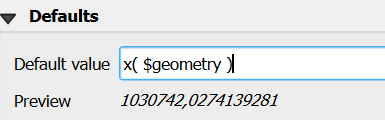
Hi! and thank you for answering. Yes, so I have actually done this for the x, y and z fields I have made. But what I am wondering is that when I am testing it out in QField on my tablet and I make a new measurement, and then sync it and look at the attribute table on my desktop all the fields show a NULL value
like on the picture, the first two points I made I had to manually add the coordinates with the field calculator, and the newest point(Test3) which has the attribute for just like you show just shows NULL values. I am just wondering if there is a way to make this more automated, so when I sync the new measurements that the coordinates are automatically there when i look at the attribute table on the desktop.
Best.
Imported from GitHub comment by @elisamist on 2024-11-13T11:34:08Z